Terminal Chat

Go beyond chat. An AI workspace with live code execution, document editing, and 40+ models.

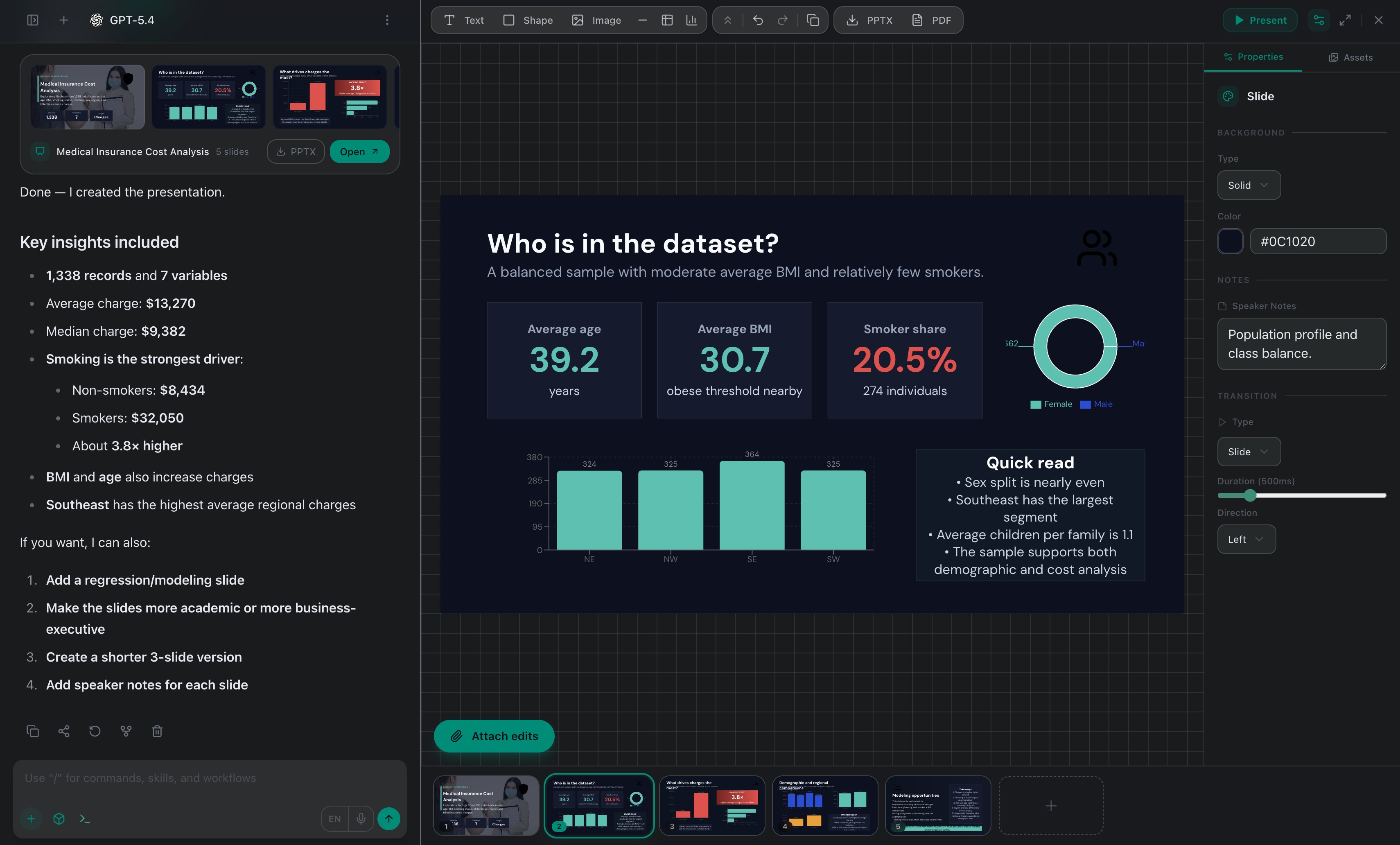
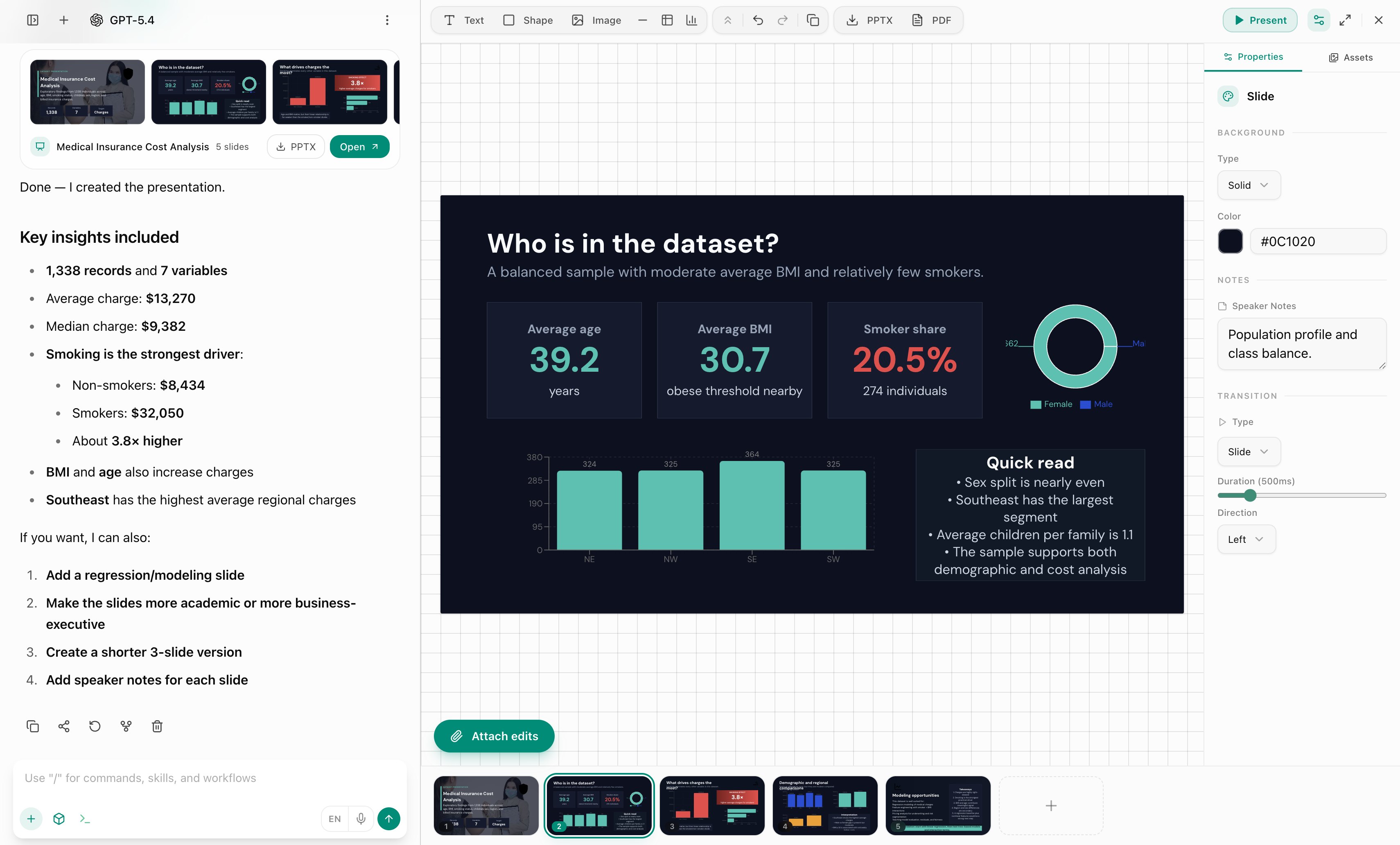
Terminal Chat — AI workspace interface Terminal Chat — AI workspace interface

Most AI tools chat.
They don't work.

You've tried AI chatbots. They answer questions, sometimes well. But when it comes to real work — they fall short.

Limited to Plain Text

Most tools can't execute code or render interactive UI components. You're stuck reading text when you could be testing real software.

Black-Box File Handling

They make you download files to see changes. You can't natively preview or edit Excel, PPT, or Word files alongside your chat.

Clunky Interactions

You are forced to use the mouse and type repetitive prompts rather than employing a rapid keyboard-first command palette.

Introducing Terminal Chat.
Your AI workspace.

One place where AI doesn't just talk — it works. Handle files, analyze data, build deliverables, research the web, and automate tasks. All in a single, powerful interface.

Live Code Sandbox & UIs

Stream and execute code in real-time. Generate HTML forms and interactive elements instantly, then submit them back to the LLM.

ZetaOffice Integration

View and edit Word, Excel, and PowerPoint files natively in a sleek sidebar viewer, fully optimized for both desktop and mobile workflows.

Command Palette & Skills

Hit Cmd+K to trigger custom skills and macros. Inject context quietly in the background without cluttering the chat timeline.

40+ AI models, one interface

Switch between GPT-5, Claude, Gemini, and dozens more — instantly. Use the right model for the right task without switching tools.

Built for real work,
not just conversation.

Multi-Model Intelligence

Access 40+ models from OpenAI, Anthropic, Google, and more. Choose the best model for every task.

ZetaOffice File Editing

A robust side drawer automatically opens for office files, letting you seamlessly preview and analyze documents as you chat.

Real-Time Code Execution

The backend seamlessly runs your scripts. Stream console logs directly into a smooth, auto-scrolling UI artifact.

Interactive Web UIs

Render HTML components as they stream in. Quickly mock up forms and capture user interactions back into the session.

Invisible Custom Skills

Use Cmd+K to select a skill. Its hidden instruction tag guides the AI response invisibly, marked only by a sleek UI badge.

Keyboard-First Control

With the fast Cmd+K command palette, dynamically toggle layout modes, execute commands, or randomize aesthetic themes on the fly.

Persistent Memory

AI remembers your preferences, context, and past work across sessions. No need to re-explain every time.

Secure Work Sessions

Your files and conversations stay private. Isolated sessions, transparent outputs, and full user control.

From daily tasks to
complex workflows.

See how professionals use Terminal Chat to get real work done, faster.

Business

  • Render internal tools and test UI concepts
  • Review data with native spreadsheet viewing
  • Debug backend issues in the live sandbox
  • Easily query files without downloading them

Research

  • Instantly mock up and tweak HTML forms
  • Review complex docs in a dedicated drawer
  • Switch seamlessly from reading to coding
  • Stream thinking and logic directly to UI

Power Users

  • Navigate solely via the Cmd+K command palette
  • Apply random themes dynamically
  • Execute invisible custom skills cleanly
  • Work with multiple AI models in one session

Three steps.
Real results.

01

Describe or upload your task

Tell AI what you need — or upload your files directly. Spreadsheets, documents, PDFs, images — it handles them all.

02

AI plans and executes

Terminal Chat breaks down your request, selects the right approach, and does the work — not just suggests it.

03

Download or refine

Get your deliverable immediately. Need adjustments? Iterate in the same conversation until it's exactly right.

Your data stays yours.

Every session is private and isolated. Your files are processed securely and never shared. You maintain full control over your data, outputs, and workspace.

Private sessions
Secure file handling
Full user control
Transparent outputs

Simple plans. Real value.

Each plan includes a monthly usage budget. Use it across any model, any task. Budget resets every billing cycle.

Free
$0/mo

Try the platform with access to select free models.

  • Access to free-tier models
  • Sandbox, files & AI tools included
  • Web search & memory
  • Limited usage budget
Get Started
Starter
$8/mo

For casual users who want access to all models.

  • $8 monthly usage budget
  • All 40+ AI models unlocked
  • Full file upload & download
  • Web research & memory
Get Starter
Power
$29/mo

Maximum capacity for power users and heavy workflows.

  • $29 monthly usage budget
  • All 40+ AI models unlocked
  • Priority execution queue
  • Maximum session resources
Go Power

Common questions.

What makes Terminal Chat different from other AI tools?

Terminal Chat goes far beyond standard Q&A. It integrates a live execution Sandbox for backend code, an HTML UI renderer to visually inspect forms and interfaces, a ZetaOffice sidebar viewer to natively review raw documents, and a powerful Cmd+K navigation system.

What file types are supported?

Terminal Chat supports a wide range of file types including Excel spreadsheets (.xlsx, .csv), Word documents (.docx), PDFs, PowerPoint presentations (.pptx), images, and plain text files. You can upload, analyze, edit, and download files directly within your session.

Is my data private and secure?

Yes. Every session runs in an isolated, secure environment. Your uploaded files and conversation data are not shared with other users or used for training. You maintain full control over your data at all times.

Do I need technical skills to use Terminal Chat?

Not at all. Terminal Chat is designed for professionals of all backgrounds. Simply describe what you need in plain language — the AI handles the complexity. Whether you're an analyst, consultant, founder, or office professional, you can get value immediately.

Is there a free plan?

Yes. You can start using Terminal Chat for free with access to select AI models and all core features including sandbox, file handling, and web search. When you're ready for all 40+ models and a larger usage budget, plans start at just $8/month.

Work faster. Work smarter.
One intelligent workspace.

Join professionals who've upgraded from chatting with AI to working with AI.

Start Free Today